Home  /  Features  /  Distribution Day

Distribution day, designed by people who run them.

From the moment a family arrives to the receipt in their hand — everything you need to move families through quickly, accurately, and with dignity.

Pre-Packed or Open Shop

However your families pick up — the system fits.

Some programs hand out pre-packed bags. Volunteers shop ahead of time based on each child's age, gender, sizes, and preferences. Other programs run an open shop where families come in and choose toys themselves from sorted bins. The first works well for drive-through events and limited space. The second works for families who get to feel like they're shopping for their own children. Toy Drive Pro supports both, and many agencies run both at the same event.

Style A
Pre-Packed Bags
Shopped ahead, picked up fast
Style B
Open Shop
Family chooses on the spot
Combined
Both at the same event
Bags for one location, shop for another
Rapid Scan
Same items for every family — just verify
$
Gift Card
Issue or scan — with signature
👜
Bag Pickup
Match family to their pre-packed bag
Signature
Capture electronic signature
One Screen, Four Modes

One workflow for staff to learn. The system handles the rest.

The distribution verify screen has four modes and you pick the one that fits your event. Rapid scan for events where every family gets the same thing — you just verify the ticket. Gift card mode for events handing out plastic or electronic cards. Bag mode for matching families to their pre-packed bags. Signature mode for events that need an electronic signature on file. Staff learn one screen and use whichever mode the day calls for.

  • Switch modes per event with a single configuration setting
  • Scan a barcode or ticket to pull up the family instantly
  • Color-coded pickup status — gray, green, yellow, red
  • Warnings on early or late pickups so staff can investigate
  • Manager override for edge cases that need a judgment call
Shopping Lists

Print a custom list at arrival, in whatever order helps you most.

When a family arrives at an open-shop event, the system prints a shopping list specifically for their children — with each child's age, gender, sizes, preferences, and any notes the parent left. Configure the list to match your physical store layout: large toys first, then medium, then small, then books, in whatever order makes the shopping flow well. If a family was assigned a bike, the shopping list automatically adjusts.

  • Per-event configuration of age groups and gift categories
  • Child-level customization based on sizes, preferences, and parent notes
  • Custom ordering to match your physical store layout
  • Automatic adjustments when a child receives a bike or sponsor gifts
  • Updates in real time as supplies change throughout the day
  • Print on standard letter paper or thermal printer
Family A-0247 · Smith
3 children · Pickup 10:30 AM
Sophia, age 4 · girl · size 4T
2 large · 2 medium · 3 small
Mason, age 7 · boy · size M
2 large · 2 medium · 3 small · bike
Liam, age 11 · boy · size L
2 large · 2 medium · 3 small
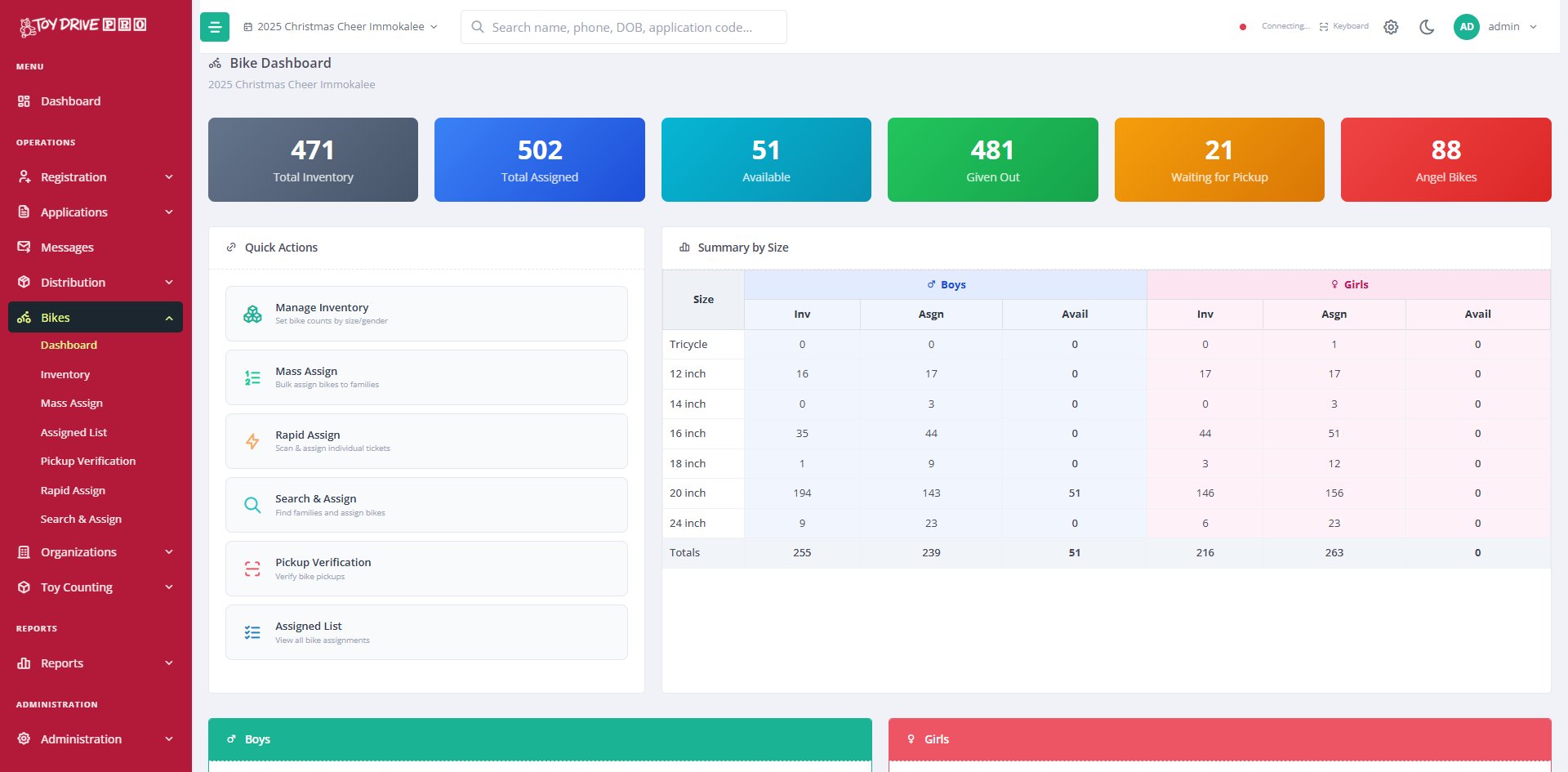
Toy Drive Pro bike dashboard showing inventory by size and assignment status
Bike Programs

Bikes by size, gender, and how your program assigns them.

Track bike inventory by size — tricycle through 24-inch — and by gender. Different programs assign bikes different ways: some by lottery, some to large families, some to single-child families, some to specific children through angel tags. Toy Drive Pro supports all of them. Print individual bike tags with the application number so the right bike goes to the right child. Filters can ensure a family that received a bike last year doesn't get another this year.

  • Inventory by size: tricycle, 12", 14", 16", 18", 20", 24"
  • Mass-assign by random lottery, by family size, or by other criteria
  • Rapid-assign individual bikes by scanning at pickup
  • Print bike tags with application number and child name
  • Filter to prevent repeat assignments year over year
  • Bikes donated to a specific family or child can be flagged
Receipts & Tickets

Receipt printing built for distribution days, not desks.

Print on a thermal receipt printer like the ones at a grocery store — no ink, no warm-up, prints in two seconds. Custom templates per event let you put your logo, the family's pickup time, the application number, special instructions, anything you need. If thermal isn't available, the system falls back to standard PDF printing on any printer. Different ticket types for food, bikes, oversized items, gift cards — print whatever your event needs.

  • Thermal receipt printing — no ink, prints in two seconds
  • Falls back to PDF printing on any standard printer
  • Custom template per event with your logo and any variables you need
  • Separate tickets for food, bikes, oversized items, gift cards
  • Pickup numbers for pre-packed bag matching
  • Bag labels for pre-pack volunteers with application number and child names
📠
Application receipt
Pickup time, application number, instructions
📠
Bike ticket
Child name, size, color
📠
Bag tag
Family number for matching
📠
Gift card receipt
Type, amount, signature line
568
Picked Up
79
Remaining
87.8%
Complete
Live Status

Know exactly where the day stands. From anywhere.

While distribution is running, anyone with access can pull up live numbers from any computer or phone — how many families have arrived, how many are remaining, which time slots are running ahead or behind, how many children by age and gender have been served. Useful for board members who want to check in, supervisors making real-time staffing decisions, or coordinators planning final pickups.

  • Live counts by family, by child, by age group, by gender
  • Pickup progress as a percentage and a remaining queue
  • Per-slot pickup tracking — which slots are running on time
  • Available from any computer or phone with login access
  • End-of-day reports generate automatically when the event closes

See distribution day running on your numbers.

30 minutes is enough to walk through what verify, shopping lists, and live status would look like for your program.

Request a Demo