Home  /  Features  /  Reports & Administration

The numbers your board reads. The settings your team controls.

Live dashboards, year-over-year reports, configurable permissions, and a complete activity log — everything your program needs after the season as much as during it.

Live Dashboards

The numbers update themselves.

Pull up the dashboard at any moment during the season and see exactly where you stand — families registered, children by gender and age, distribution progress as a percentage and a count, today's pickups, toys received, bikes given, gift cards issued, adopted families. Every number updates live as staff work. No spreadsheet to maintain. No end-of-day tally to wait for.

  • Families registered, individuals served, distribution progress
  • Children broken down by age group and gender
  • Toys given, bikes given, gift cards issued, adopted families
  • Charts for distribution status, gender split, age group
  • Available on any device with a login — computer, phone, tablet
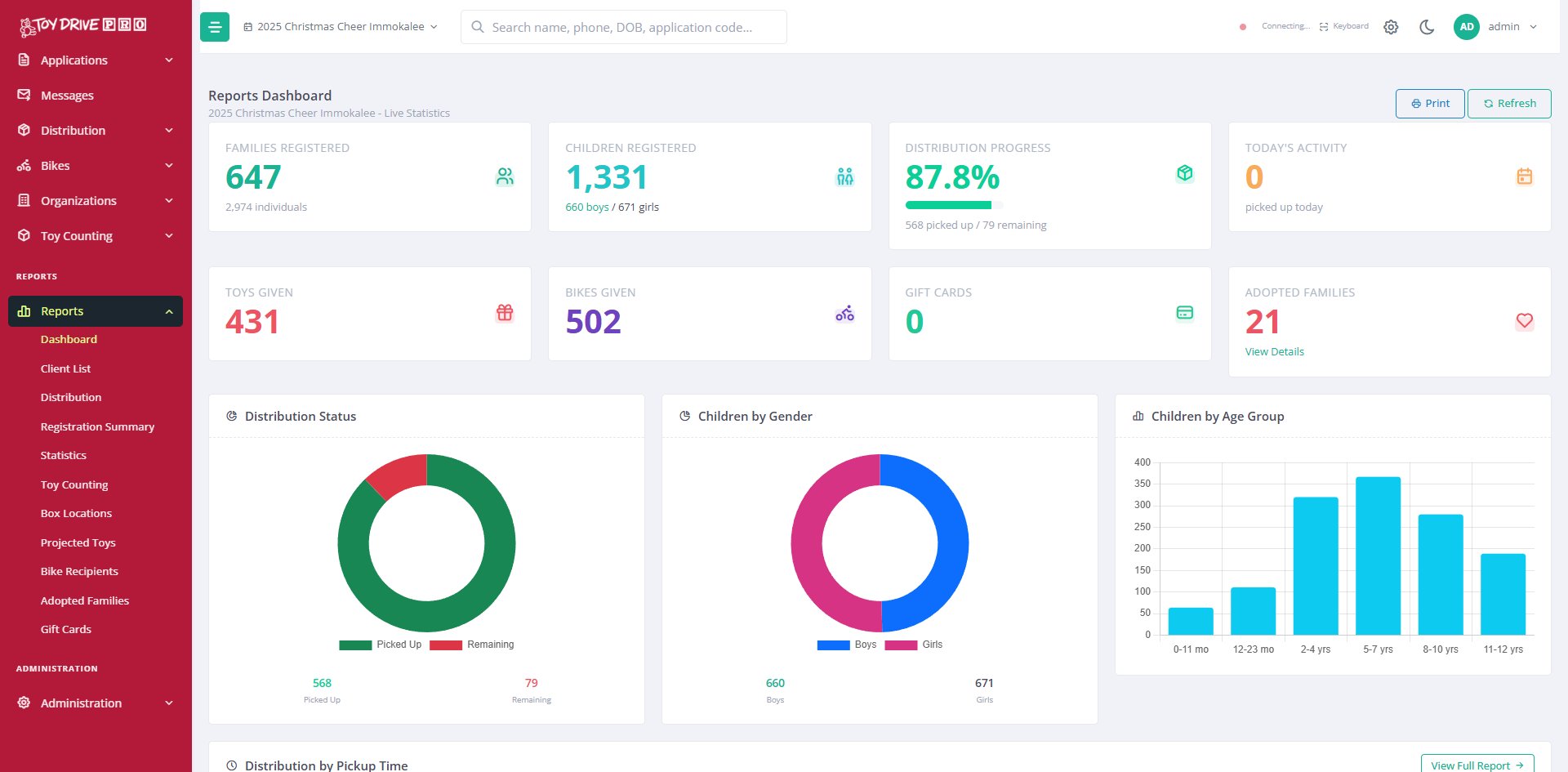
Toy Drive Pro dashboard with live registration, distribution, and donation stats
Distribution
By location, by hour
Registration
By date, by source
Toy Counting
Received vs sorted
Projected Toys
Need vs have
Bikes
Inventory & recipients
Gift Cards
Issued, by family
Adopted Families
Sponsor & status
Box Locations
By sponsor, by zone
Client List
All families served
Statistics
Demographics roll-up
Reports You Already Need

The reports you'd build in Excel by hand — already in the system.

Every report that boards, funders, and auditors typically ask for is built in. Pull a registration summary by date or source, a distribution report by location or pickup hour, a toy counting report showing received versus sorted, a projected toys report showing what you'll need to fill remaining gaps. Every report exports to Excel so you can take the data wherever you need it — into board packets, grant applications, or your own analysis.

  • Distribution, registration, toy counting, projected toys
  • Bike recipients, gift cards, adopted families, box locations
  • Client list, statistics, demographic roll-ups by ZIP and age
  • Export anything to Excel with one click
  • Print-ready PDF versions for hand-outs
  • Filter and date-range every report
User Permissions

You decide what each person can do.

Not every staff member or volunteer needs to see everything. The registrar shouldn't need to see donation collection. The volunteer scanning toys shouldn't need to register families. A board member checking dashboards shouldn't be able to edit anyone's data. Toy Drive Pro lets you configure exactly what each user can do — not just "admin" or "non-admin." A registrar can register. A verifier can verify. A toy counter can count. An admin can do everything. And any combination of the above for the people who wear multiple hats.

  • Unlimited users on every plan
  • Per-capability access: register, verify, count, message, manage
  • Read-only access for board members and stakeholders
  • Enable or disable a user without deleting their history
  • Every action a user takes is logged with timestamp
Sarah · Volunteer Lead
Register
Verify
Bikes
Count
Sort
Messages
Reports
Setup
Admin
Sarah registered family A-0492
10:42 AM · today
Mike verified pickup A-0247
10:38 AM · today
Lisa overrode duplicate alert A-0491
10:34 AM · today
James assigned bike to A-0245
10:31 AM · today
Activity Log

Every action, by every user, for every event.

Every change in the system is recorded — who did it, when, and what changed. When a board member asks how a family ended up assigned to two pickup times, when an auditor wants to see who issued a gift card, when something goes wrong and you need to trace it back, the activity log shows you exactly what happened. Searchable by user, by family, by date, by action type.

  • Every registration, edit, verification, and gift card issuance
  • Every duplicate alert and override, with the staff member who overrode
  • Every user login and session
  • Searchable and filterable, exportable to Excel
  • Retained indefinitely — useful for audits years later
Event Configuration

Set up next year by duplicating this year.

When a new season starts, duplicate last year's event with one click — pickup time slots, age groups, gift categories, messaging templates, branding, every setting. Adjust what changed. Open registration. You're done in fifteen minutes instead of starting from scratch. Multiple events per year for agencies that run separate Christmas, back-to-school, and Thanksgiving programs. Secondary event linking for agencies that run paired programs.

  • Duplicate prior year's event with all settings preserved
  • Per-event age groups, gift categories, time slots
  • Per-event branding — logo, colors, contact info on receipts
  • Per-event message templates in your community's languages
  • Multiple events per year for agencies running several programs
  • Secondary event linking for paired programs
2024 Christmas Cheer
2,847 families served
Closed
2025 Back-to-School
412 families served
Closed
2025 Christmas Cheer
647 registered · in progress
Active
2026 Easter Baskets
Configured from 2025 template
Upcoming
🔒
Secured cloud storage
Files protected and access-controlled
🔒
Daily automatic backups
Off-site, retained for recovery
🔒
Separate data per organization
Your data is yours alone
🔒
No sharing between providers
Even cross-agency dedup is anonymous
Security & Privacy

Built to handle what families trust you with.

Toy Drive Pro is built to protect what families share with you. Every organization's data is kept separate — one agency can never see another agency's clients. Cross-agency duplicate detection works by answering yes or no without ever sharing the underlying information. Daily automatic backups mean a hardware failure or a mistaken delete doesn't end your season. And the activity log means you can always answer the question of who saw what, and when.

  • Separate, isolated data for every organization
  • Daily automatic backups, retained off-site
  • Secured cloud storage for uploaded documents
  • Cross-agency duplicate detection without sharing client lists
  • Configurable user permissions limit who sees what
  • Complete activity log of every access and change

See it running on your numbers.

30 minutes is enough to walk through dashboards, reports, and admin settings for your program.

Request a Demo