Home  /  Features  /  Donation Collection

Every gift accounted for, from sponsor to child.

Angels, collection boxes, adopt-a-family, drop-offs — whatever way your community gives, the system tracks it.

Two Ways to Collect

Angels, boxes, or both. Most programs use a mix.

Some programs run on angel tags — a specific child's wishes printed (or posted online) for sponsors to take and fulfill. Others put collection boxes in storefronts and offices, and let the community drop whatever toys they choose. Many programs do both: angels for the families they have, boxes to fill in the gaps. Toy Drive Pro handles all of it without making you pick a side.

Model A
Angel Tags
A sponsor adopts a specific child
Model B
Collection Boxes
Anyone donates toys in general
Model A + B
Both at once
Angels for known families, boxes for gaps
A-1024 · Boy, age 8
Loves dinosaurs · Size M shirt
Taken
A-1025 · Girl, age 3
Loves art supplies · Size 4T
Returned
A-1026 · Boy, age 11
Taken Nov 10 · Not yet returned
Pending
A-1027 · Girl, age 6
Reassigned — sponsor declined
Reassigned
Angel Tags

Track every angel from the moment it leaves your hands.

Print angel tags personalized with each child's age, gender, sizes, and gift preferences — or post them online for sponsors to claim from a public page. Either way, the system tracks where every angel went and whether the gifts came back. When a sponsor can't follow through, the angel can be reassigned automatically, and the child's shopping list updates to make sure no one gets missed.

  • Print or post online — sponsors can claim from a public page
  • Personalized for each child: age, gender, sizes, gift preferences
  • Scan tags back in as gifts arrive to record what was returned
  • Give credit to the sponsor company or individual
  • Reassign or fill in for unfulfilled angels automatically
  • Adopt-a-family variant for sponsors who take an entire household
Collection Boxes

Every box, every storefront, on one map.

Track every collection box location across your community — sponsor companies, addresses, hours, contacts, and the year they signed on. Import new sponsors in bulk from a spreadsheet. The system geocodes addresses automatically so every box shows up on a map. Print box labels with built-in barcodes so volunteers can scan donations into the right box on receipt.

  • Hundreds of box locations managed from a single dashboard
  • Bulk-import sponsors from a spreadsheet, addresses geocoded automatically
  • Print barcoded box labels — 4×6, 1/2/4/6 per page
  • Scan donations into inventory at receipt with timestamp and source
  • Public-facing drop-off finder so the community can find your boxes
  • Online request form for new sponsors to sign up
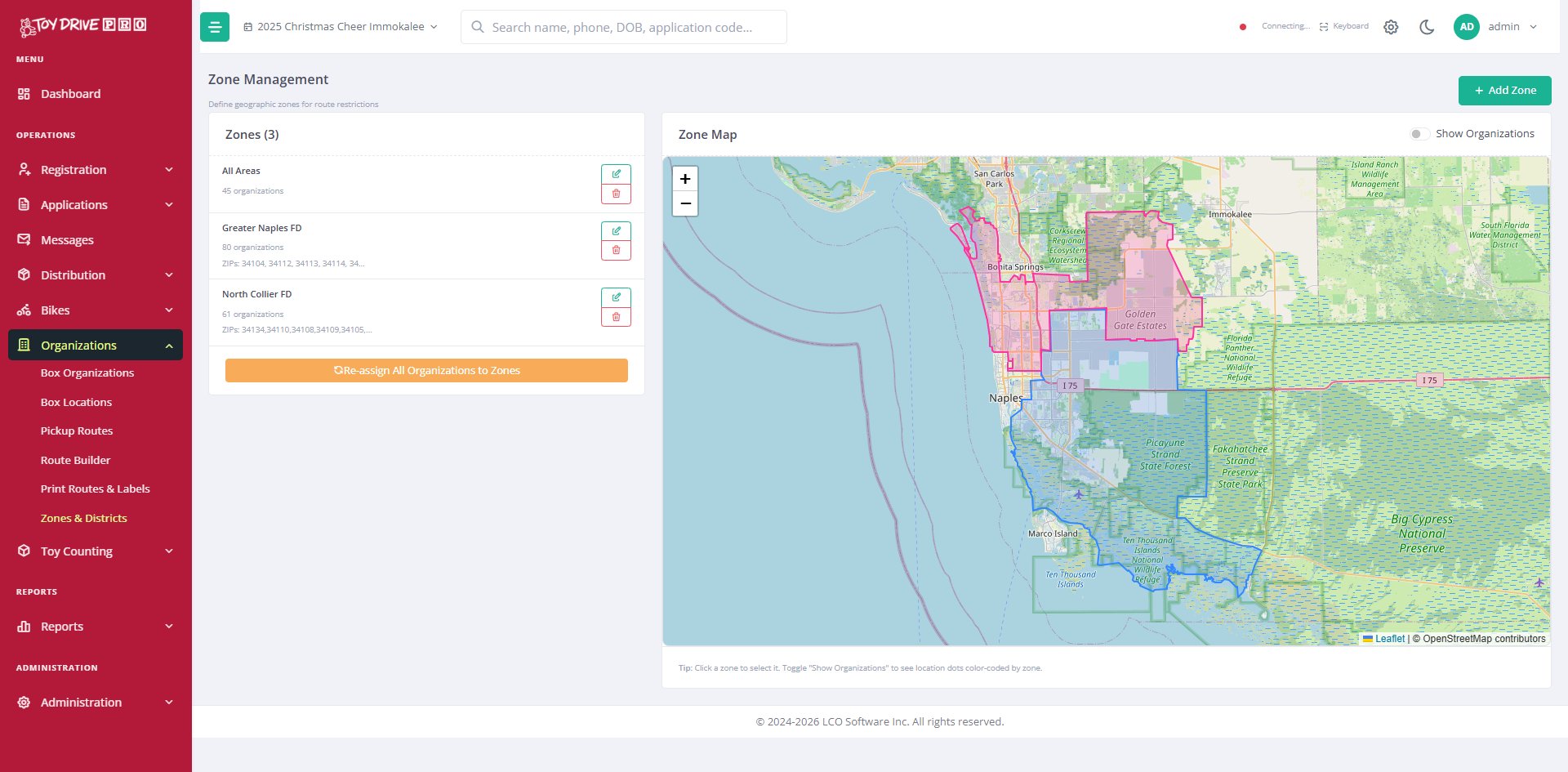
Toy Drive Pro zone management map showing collection box coverage areas
1
Route 1 · Driver: Mike
18 stops · 47 miles · 4hr 20min
2
Route 2 · Driver: Sarah
22 stops · 52 miles · 4hr 50min
3
Route 3 · Driver: James
15 stops · 38 miles · 3hr 50min
55 boxes, 3 drivers, optimized
Planned in under a minute
Route Planning

Plan pickups in a minute. Drive them in less time.

What used to mean printing a map, plotting stops by hand, and hoping the driver figured out the order — now happens in seconds. The system optimizes pickup routes across multiple drivers and days, accounting for your starting point and where the boxes need to come back to. You can drag stops around on an interactive map to make adjustments. Print Excel or PDF route sheets with a master map and per-vehicle stop lists.

  • Optimize routes across multiple drivers and multiple days
  • Interactive map with drag-and-drop adjustments
  • Geographic zones — restrict pickups to specific service areas or fire districts
  • Excel and PDF route exports with master map and per-vehicle stop lists
  • Pickup confirmation by scanning each box label on arrival
Counting & Sorting

Every toy counted on the way in. Every toy counted on the way out.

When a collection box comes back, volunteers scan the box label and start scanning toys. The system shows a giant running count as each toy is added, with sound feedback for each scan. Switch into sort mode and scanned toys go into the right age and gender bins for distribution. Custom toy types let you track exactly what your community is donating — with auto-generated barcodes you can print on a reference sheet for volunteers.

  • Two modes: receive (from a collection box) and sort (into age/gender bins)
  • Fast scanning even on slow connections — works in a warehouse
  • Custom toy types with auto-generated barcodes
  • Volunteer-friendly reference sheet with all your toy type barcodes printed
  • Sort bin labels printable as 4×6 sheets, 1/2/4/6 per page
Receive Mode
Toys For Tots Walk-in · B0023
2,368
toys in this box
Scanner ready
Scan next toy or box label
$
Walmart eGift · $50
Delivered to family · signed receipt
eGift
$
Walmart eGift · $25
Delivered to family · signed receipt
eGift
$
Publix Plastic · $25
Card #7787...8798 · signed at pickup
Plastic
All cards accounted for
Full audit log available
Gift Cards

eGift cards and plastic cards, tracked the same way.

For eGift cards, you (or we) import a batch into the system — one row per card with the link and code. When you issue one to a family, the family signs for it on screen, and the link is delivered by text and email. For plastic cards, scan the card number into the family's record at pickup and capture a signature. Either way, you have a complete record of which family got which card.

  • Bulk import eGift cards from a spreadsheet of links and codes
  • Family signs on screen before the link is revealed
  • Link delivered by text and email so the family has it on hand
  • Scan and record plastic gift card numbers with required signature
  • Per-family and per-child amount tracking
  • Full audit log of every card issued, with date, time, and signature

See donation collection running on your numbers.

30 minutes is enough to walk through what angels, collection boxes, and route planning would look like for your program.

Request a Demo