Home  /  Features  /  Registration

Registration that fits how families actually reach you.

Online from home. In person at your office. Through partner schools or agencies. Toy Drive Pro supports every path — and gets people through it faster.

The Three Paths

Online, in person, or through a partner. Your call.

No two agencies run registration the same way. Some go fully online to spare families a trip. Some hold dedicated registration days. Some rely on guidance counselors at partner schools or staff at affiliated nonprofits to register families on their behalf. Toy Drive Pro is designed to support all three at once — in the same event, with the same data, with the same duplicate checks running across all of them.

Mix and match as your program needs change. Open online applications first, run an in-person day for families who couldn't apply on their own, then let a few partner agencies fill in the gaps. It's all the same registration system underneath.

1
Online Application
Family applies from home, uploads documents
2
Walk-In Registration
Staff register in-person, fast
3
Partner Agency Entry
Schools or affiliates register their clients
Parent & address
Verified against postal records
EN
Children & ages
3 children added
EN
3
Upload ID & birth certificates
PDF, JPG, or photo from phone
EN
4
Choose pickup time
Or wait for assignment
5
Submit & confirmation
By SMS and email
Online Application

An application families can finish on their phone, on their lunch break.

The online application guides families step by step, in their language, with validation along the way so applications come in complete the first time. Document upload means staff can review and approve on their own schedule — no dedicated registration day needed.

  • Available in English, Spanish, Creole, Russian, and French
  • Mobile-optimized — works on any phone the family has
  • Repeat clients log in and find last year's information already filled in
  • Document upload: ID, birth certificates, proof of address, anything you require
  • Staff review queue with auto-rotation for sideways photos and face extraction for fast visual matching
  • Approve in bulk by ZIP code, document status, or application source
Walk-In Registration

For families who walk in, registration that doesn't make them wait.

For agencies that still hold in-person registration — or want to support both paths — the walk-in workflow is designed for speed. Search by name, phone, or date of birth. Returning families load with everything from last year filled in: address, children, sizes, preferences. New families enter once, and next year it's all there.

For agencies that use them, optional ID scanning can auto-fill the parent's name, date of birth, address, and ID number. Optional — some families bring driver's licenses, others bring passports or municipal IDs that don't scan. Staff can always enter by hand.

  • Instant search by name, phone, date of birth, or application code
  • Returning clients load complete prior-year data in one click
  • Optional driver's license scan for new clients
  • Configurable required fields, custom fields per event
  • Children added inline with sizes, preferences, and notes
  • Pickup time slot assigned automatically based on your rules
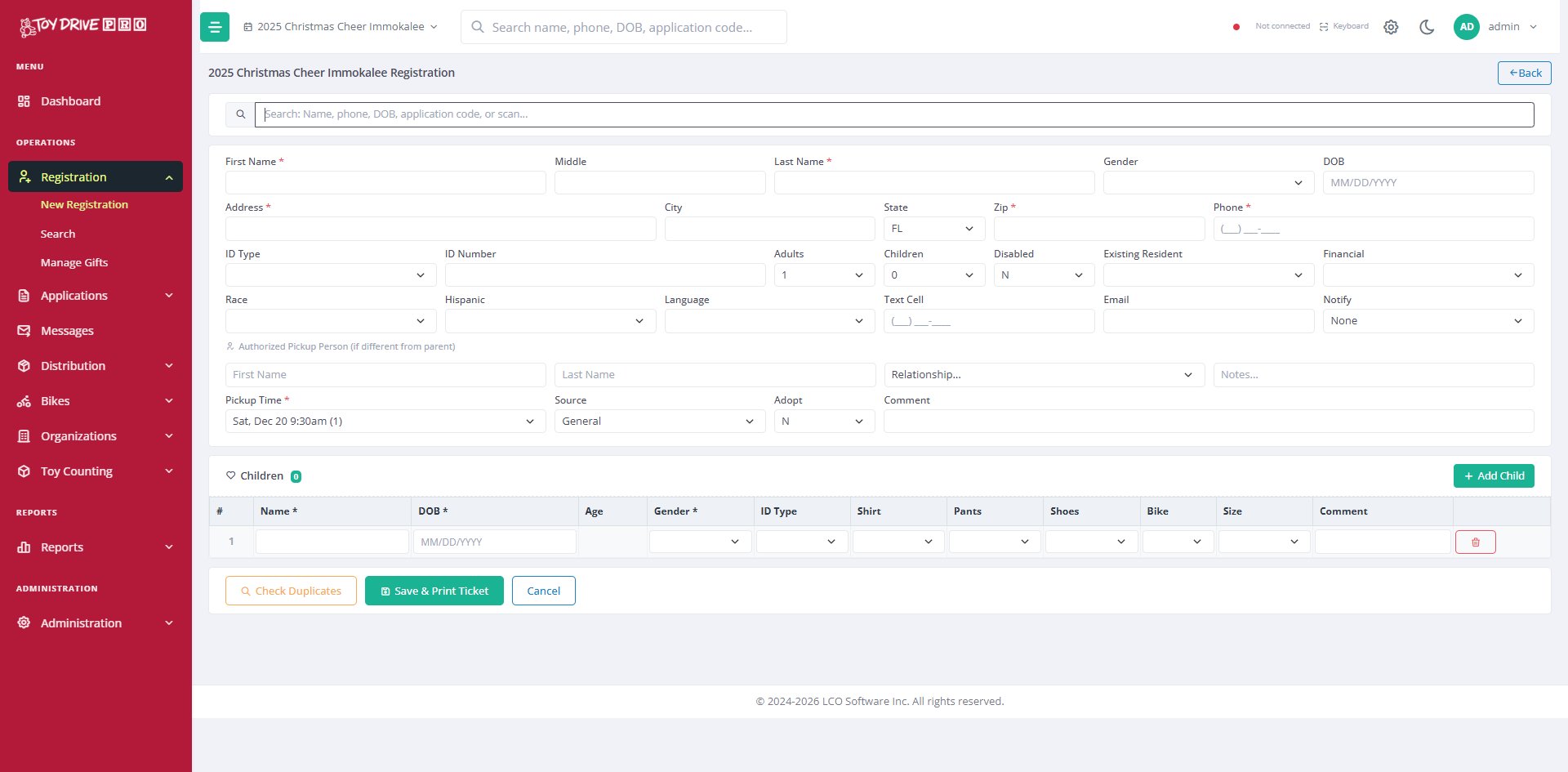
Toy Drive Pro walk-in registration form with search, parent fields, children, and pickup time
No match
Save and continue
Possible match
Review and confirm before saving
Almost certainly a duplicate
Save blocked; manager override available
Duplicate Detection

Catch duplicates without sharing client lists.

Every registration runs through real-time duplicate checks — by parent ID, address, phone, email, and every child's date of birth and gender. Green means safe to save. Yellow means a possible match worth reviewing. Red means the system is confident enough that it blocks the save until staff confirm with a manager override.

When two or more agencies in the same community use Toy Drive Pro, they can opt into cross-agency duplicate detection — checking each other's registrations in real time without ever sharing actual client information. Each agency keeps its own data private. The system just answers yes or no.

  • Matches on parent ID, address, phone, email, and every child's date of birth + gender
  • Three-tier alerts — green, yellow, red — with manager override on red
  • Cross-agency duplicate checks without sharing client lists or personally identifying data
  • Catches duplicates that "name and address" matching alone would miss
Pickup Time Scheduling

Spread families across the day. Eliminate the line.

Define your distribution day in time slots — 15 minutes, 30 minutes, whatever fits your space. Set how many families (or children) can be assigned per slot. The system handles assignment automatically as each registration is submitted, so families know exactly when to arrive.

Assign times sequentially if order matters, or randomly if fairness matters — agencies running open-shop distributions often choose random so families don't game the system to arrive when toys are freshest. Either way, every family leaves registration knowing their slot.

  • Sequential or random assignment, configurable per event
  • Capacity limits by family count, child count, or both
  • Multiple distribution days, multiple locations, multiple slot patterns
  • Slot shown on registration confirmation, in SMS and email
  • Real-time tracking of which slots are full and which still have capacity
Sat, Dec 20 · 9:00am
Capacity: 25 of 25 families
Sat, Dec 20 · 9:30am
Capacity: 25 of 25 families
·
Sat, Dec 20 · 10:00am
17 of 25 — assigning to new registrants
·
Sat, Dec 20 · 10:30am
0 of 25 — available
Confirmation sent
SMS & email, in family's language
EN · ES
Reminder — 3 days before
Automatic, customizable
EN · ES
Reminder — morning of
Sending now
EN · ES
Missed pickup follow-up
Only if family doesn't arrive
Confirmations & Reminders

The family knows what to do, in their language.

Every registration sends a confirmation by text message, email, or both — in whatever language the family chose during application. Reminders go out on a schedule you set: three days before, morning of, missed pickup follow-up. Each message can include the family's name, pickup time, location, and anything else you want.

  • Text messages and emails sent in the family's preferred language
  • QR codes sent by text and email for quick lookups at pickup
  • Reminders on the schedule you choose — not just one cookie-cutter "day before"
  • Missed-pickup follow-up so no family gets left behind
  • You write the wording — templates are fully editable per event
  • Delivery tracking on every message

See registration running on your numbers.

30 minutes is enough to walk through what online applications, walk-in, and duplicate checks would look like for your program.

Request a Demo